
New: Fresh Tools in Your Keyword Toolbox
We’ve made more improvements… again!
We’ve released 2 new tools that are complementary to the keyword research tools, designed to help you make the most out of the latest updates.
The third update is ghost categories for the Category Explorer tool.
Here are more details:
New Tool: Keyword Filler
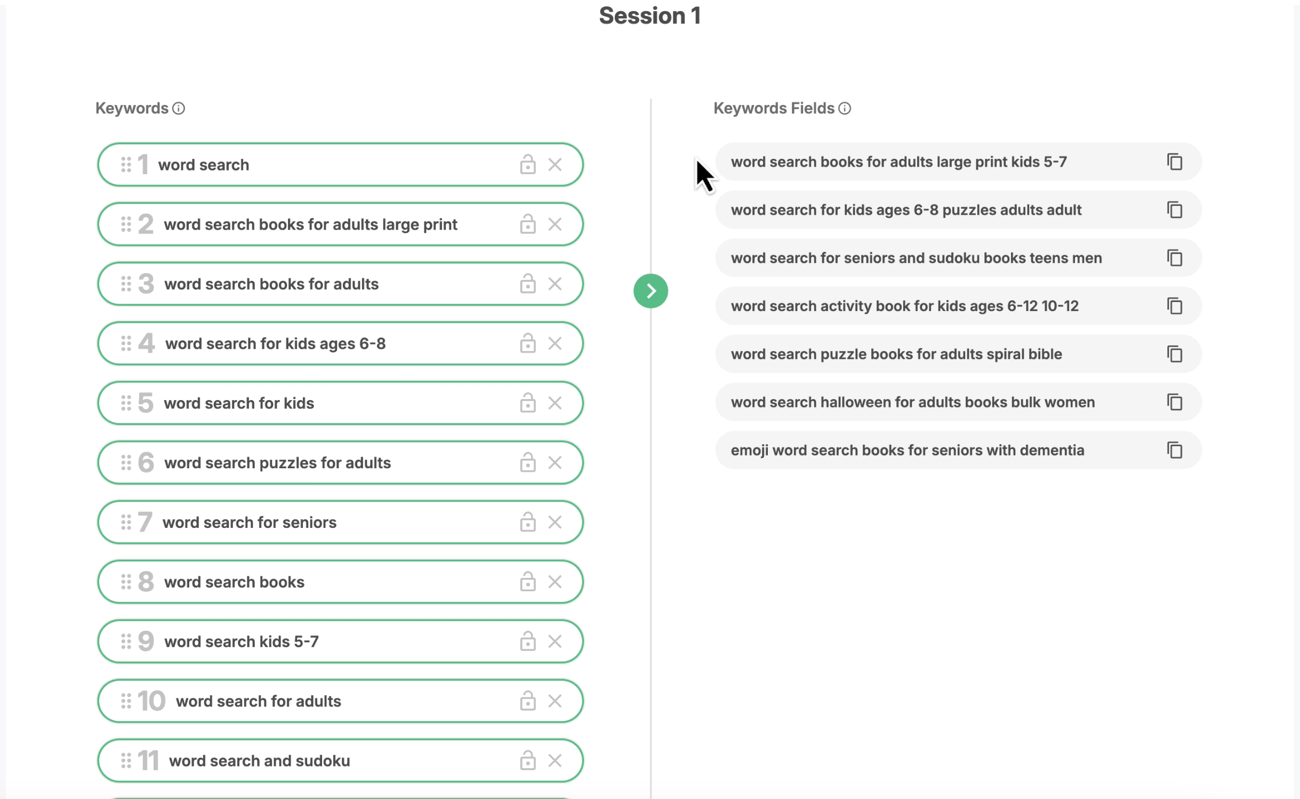
Rank for as many of your target keywords as possible with the 7 KDP Keyword fields with the Keyword Filler tool.
Just provide a list of keywords that you would like to rank for and this tool will fill out the 7 KDP backend keyword fields to rank for as many of them as possible.
The 7 KDP Keyword fields rank based on a “phrase match” setting which means that a phrase like word search books for adults kids 5-7 large print will rank for all the keyword combination that can be found within it like:
word search
word search books
word search for adults
word search books for adults large print
word search for kids
word search for kids 5-7 etc.
The Keyword Filler tool helps you to fit as many of your keywords into the 7 KDP keyword fields as possible.
New Tool: Keyword Lists
Easily create keyword lists as you use the Keyword Research Tool and Reverse Keyword Search Tools. Make sure not to miss any of the interesting keywords ideas by saving them in a list.
You can also create lists with keywords that you target on Amazon ads.

Ghost Categories on Category Explorer

Now you can see and filter ghost categories on the Category Explorer Tool.
What are “ghost categories” you ask? Categories that don’t have a path and are not discoverable by customers but they still exist and Amazon allows you to place your book inside them. But of course, you shouldn’t because that would
Essentially, these are categories to avoid.